Shopify Settings
Connecting DTF Gangsheet Maker to your Shopify store requires a few steps before this one. If you have not already done so, please see the Shopify Integration page for more information.
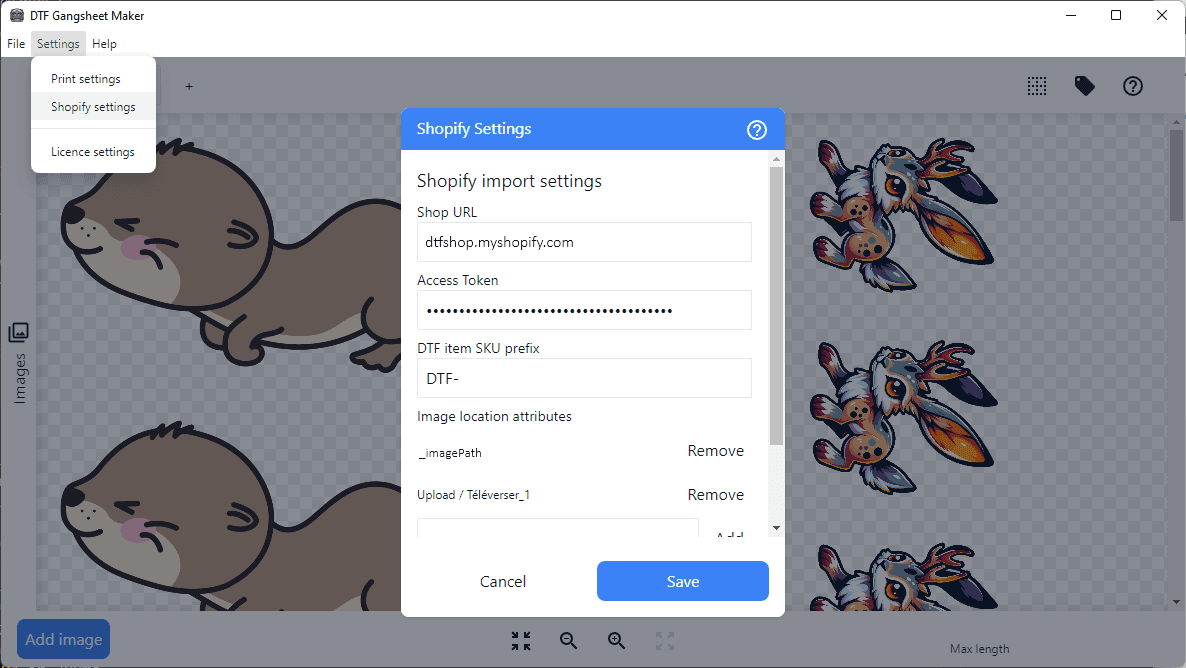
Shop URL
Your Shop URL is the myshopify.com subdomain assigned to your store. You can find this in your Shopify Admin under Settings > Domains.
Alternatively, you can deterimine the address from your admin url. If your admin url is https://admin.shopify.com/store/dtfshop, your Shop URL would be dtfshop.myshopify.com.
Access Token
Enter the access token shpat_... that was generated when you created a custom app in your Shopify store. See Custom Shopify App for details. This token is used to authenticate DTF Gangsheet Maker with your store.
Important note: The access token is a sensitive piece of information that should be kept secure. Do not share it with anyone or store it in a public location. DTF Gangsheet Maker uses your operating system’s secure storage to encrypt this information. Only the encrypted information is stored on your computer.
Windows: Encryption is handled by the Windows Data Protection API .
MacOS: Encryption is handled by the MacOS Keychain Services .
Linux: Encryption is handled by the Linux secret store which varies depending on your window manager and system setup. Options currently supported are kwallet, kwallet5, kwallet6 and gnome-libsecret.
SKU prefix
If applicable, enter the prefix that you configured for your product skus in Shopify. Only products with skus that start with this prefix will be imported.
If left blank, no filtering will be applied and all orders will be made available for import, though only those containing the configured line item properties will successfully import.
Image location attributes
Enter the line item property name that you configured in your Shopify theme to store the image path, for example _imagePath. This is the key that DTF Gangsheet Maker will use to retrieve the image path from the order.
Local image folder
If you are using a local image library, browse to and select the folder where your images are stored.
If your library has subfolders, the line item attribute (ie _imagePath) value should include the subfolder path, for example /subfolder/image.jpg.
Save
Click the Save button to save your settings. You can now import orders from Shopify!