Licence Settings
DTF Gangsheet Maker offers a 30 day free trial. After the trial period, you will need to purchase a licence to continue using the application.
Open the Licence Settings by clicking on Licence Settings in the Settings menu.
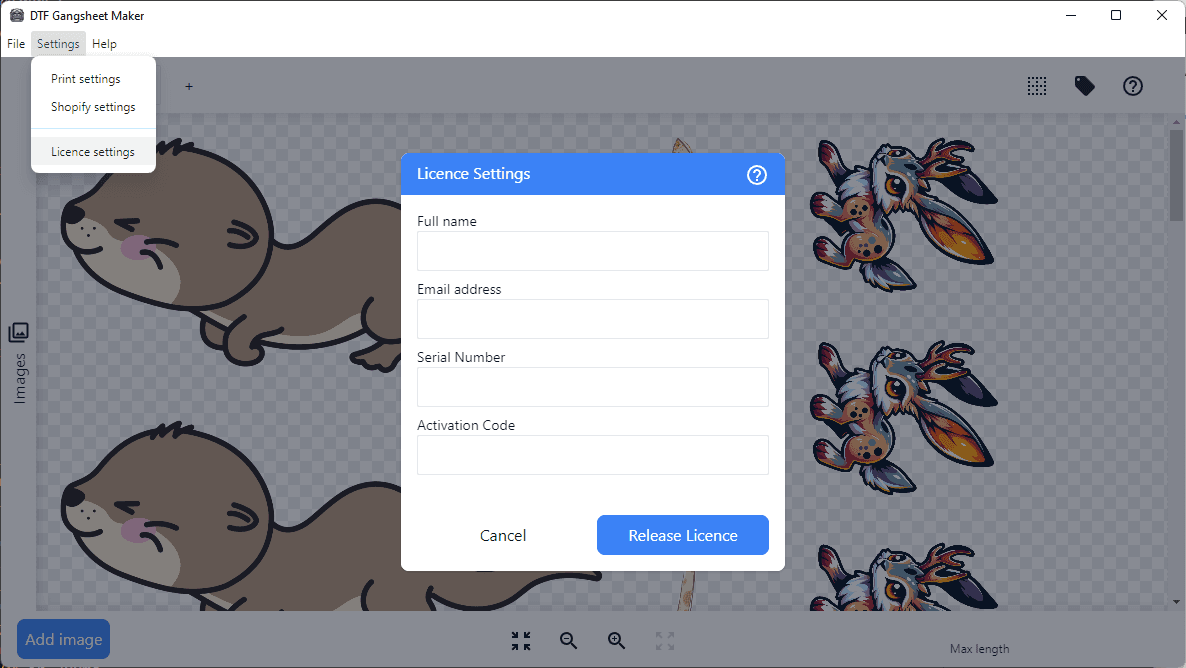
Activate a trial licence
To activate a trial licence, enter your name and email address in the fields provided and click on Activate Trial.
A trial licence is limited to 30 days and is only available once per device.
Purchase a licence
When your trial licence expires, you will need to purchase a licence to continue using DTF Gangsheet Maker. You can do so at https://gangsheet.wc8.io/purchase .
Both subscription and perpetual licences are available. Subscription licences are billed monthly or anually and can be cancelled at any time. Perpetual licences are a one-time purchase and include one year of updates.
Serial number
The serial number is automatically generated based on your device’s hardware. When you activate a licence with an Activation Code, your Serial Number is linked to the Activation Code and authorizes the use of the application.
Activation Code
When you purchase a licence, an activation code will be emailed to you. Enter the activation code in the Activation Code field and click on Activate Licence.
Release Licence
Licences are valid only for the activated device. In the event you need to move your licence to a different device, you must first release the licence from the current device.
Important: Once you release a licence, the activation code will be removed from the software. Make sure you have a copy of your activation code before releasing the licence.
To release a licence for use on another device, click on Release Licence.
Licence verification
DTF Gangsheet Maker verifies the authenticity of your licence with the licencing server each time the application is started and intermittently during its use. If the licence is not valid or the licencing server is blocked from being reached the application will notify you that it is unlicenced and will prevent you from using the application until the issue is resolved.
To ensure that the licence server is reachable, please ensure that your firewall and antivirus software are not blocking the application from accessing the internet.
If the issue persists, speak with your IT department or network administrator to ensure that the following URL is whitelisted: https://licence.wc8.io/